.jpg)

When2Meet: Ultimate Step-by-Step Guide to Scheduling Group Meetings
If you've ever had the misfortune of trying to get a whole bunch of people together - be it five, ten, or even twenty - you'll know how quickly things can start to fall apart. Messages are zipping back and forth, calendars are one person's mess, and time zones turn what should be a simple exercise in planning into a right old headache.
That's where tools like When2Meet come in: to make that whole process a whole lot simpler.
At its heart, When2Meet is a free online calendar tool that makes it easy for groups to sync up and co-ordinate their availability on a shared grid. People just mark off when they're free, and the tool highlights where there's any overlap - making it dead simple to find a time that works for everyone.
In a lot of basic group coordination situations, it works quite well.
But as soon as you start to get a bit more complicated - no calendar syncing, automatic reminders or deeper integrations to tie in with other tools - you start to see some of the limitations. That's what we'll be comparing to other tools a bit later on. First though, let's have a closer look at exactly how When2Meet works.
Who Uses When2Meet?
- Students trying to get study groups together
- Small community groups looking to sync up
- Local clubs and organisations
- Project teams that need a quick way to find a time
- Anyone who wants to be able to schedule a meeting without having to go through a login process
What Is When2Meet?
When2Meet is a free online meeting scheduler that makes it a cinch for groups to figure out a time that works for everyone - no sign-up or complicated setup required. All you need is a shared calendar grid where each participant marks off the times they're free.
You create your event, share the link with the gang, and they can just pick the time slots that work for them - the tool will instantly highlight where all of you are available at the same time. The more people who are free at the same time, the darker that time slot will show up making it super obvious which one is the best bet.
This straightforward way of doing things really does make a big difference - bye-bye calendar comparisons - and it works an absolute treat for groups who just need to sort something out quickly. That's why students and casual groups are all over When2Meet - it's a super simple, no fuss way to get a meeting sorted without breaking out the heavy-duty scheduling tools.
But while it's super handy, don't expect When2Meet to come with all the bells and whistles of a proper scheduling platform. No fancy booking pages, no payment processing - it's a deliberately simple tool that's just good enough for small teams and groups who don't need all that extra stuff.
Key Features of When2Meet
When2Meet hinges on a pretty straightforward idea: making it super easy for groups to get a clear picture of when everybody is free. Despite the platform not changing all that much over the years - and that's probably its greatest strength - it still manages to be super useful for a lot of users.
At its core, there's the availability grid. People just pick the time slots that work for them within a specific time frame and you get a shared schedule that makes it dead easy to see where people have any overlap.
The grid lays out available time slots, the days involved and how many of you are free at any given time. As you'd expect the more people that are free at a particular time, the darker the colour gets - which makes it a doddle to figure out when to schedule a meeting.
What I love about this system is that it makes it totally unnecessary to go trawling through each other's calendars by hand - which is a godsend for a quick group meet-up. Now modern tools do tend to build on this idea with features like calendar syncing and automated suggestions but the core idea is still simplicity itself and still really bloody effective.
No Login Required - The Ultimate in Convenience
One of the main reasons people love When2Meet is that you don't have to log in to use it. Just click on the event link and you can quickly see who's available and mark your own availability. That makes it super easy to get meetings scheduled, especially when you're dealing with a big group. You don't have to waste time creating accounts just for a single meeting, which is always a plus.
But the flip side is that there's no way to verify who's accessing the page. That can make some people nervous about privacy or accidental changes to the schedule - so while it's not a huge issue for casual use, it can be a bit of a problem in more formal settings.
Time Zone Support - Helping Avoid Those Awkward Moments
We also include basic time zone support in When2Meet. What that means is that when people log in to check the events, the system automatically adjusts the schedule to show them the meeting times in their local time zone. That saves a lot of time and confusion, especially when you're coordinating with people from different parts of the country or world.
It works pretty well for simple scheduling, but it's not always reliable for big teams that are all over the place. Our interface is mainly designed for desktop, and while it works on mobile devices, it's not all that user-friendly on smaller screens. More advanced scheduling tools often do a way better job, especially if they can sync directly with your calendar and automatically flag up any conflicts.
Poll-Based Scheduling - Quick & Easy, but a Bit Basic
At the end of the day, When2Meet is just a simple scheduling poll. You create an event, people select their availability, and then you all choose a time slot that works for everyone. It's a pretty effective way to get a group together quickly, but it's still all manual.
If you need any of the bells and whistles - like calendar integration, reminders or automated scheduling workflows - you're probably going to want to look at other tools. They can take this basic concept and turn it into something a whole lot more streamlined and user-friendly.
Step-by-Step Guide: How to Use When2Meet
Alright, let’s move from theory to practice and walk through how to schedule a meeting using When2Meet. The process is simple, and once you try it, the workflow becomes much easier to understand. As you go, the tool automatically saves your changes, so you don’t have to worry about losing any data.
Step 1: Create an Event
Start by visiting the When2Meet homepage and clicking Create Event.
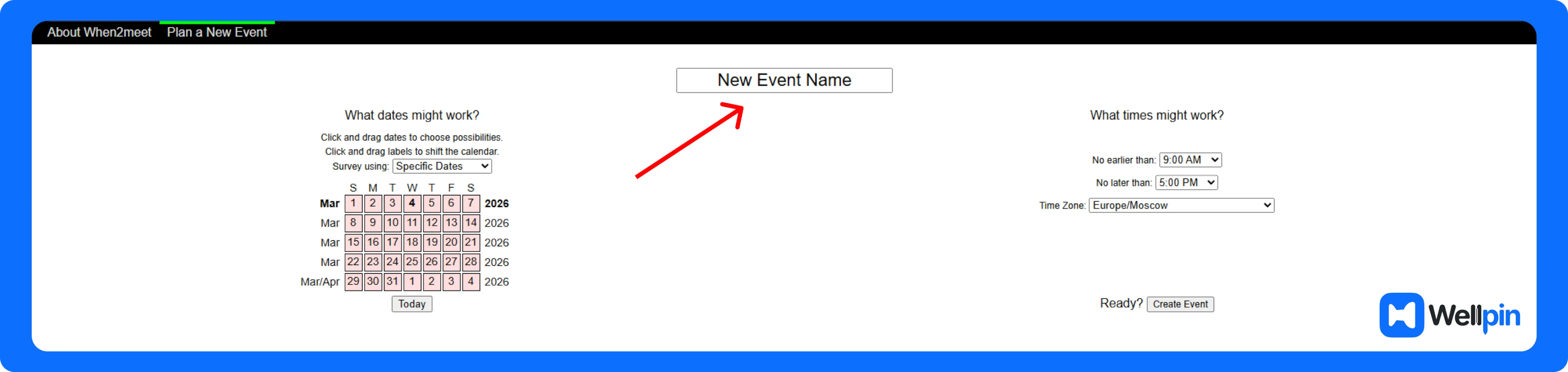
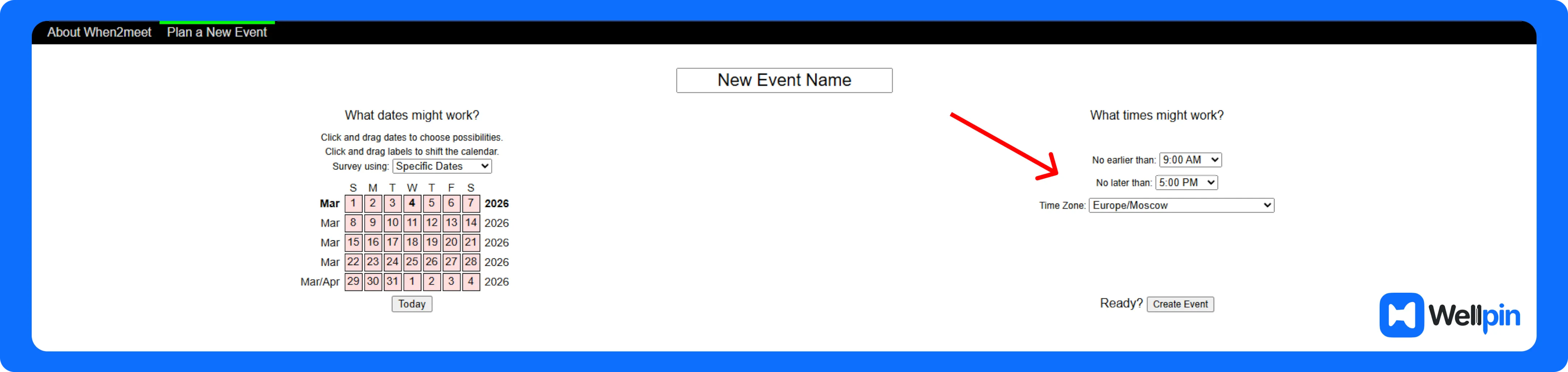
You’ll need to define a few things first:
- the event name
- the possible time range
- which days the meeting could happen
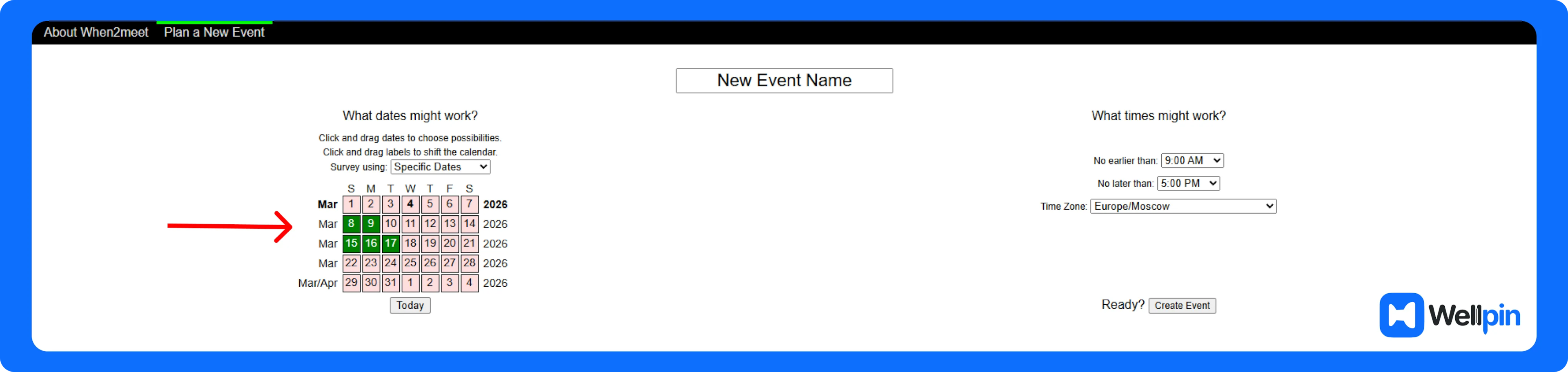
These settings determine the scheduling grid participants will see when marking their availability.
The tool then generates a page where all users can contribute their schedules.
Step 2: Share the Link
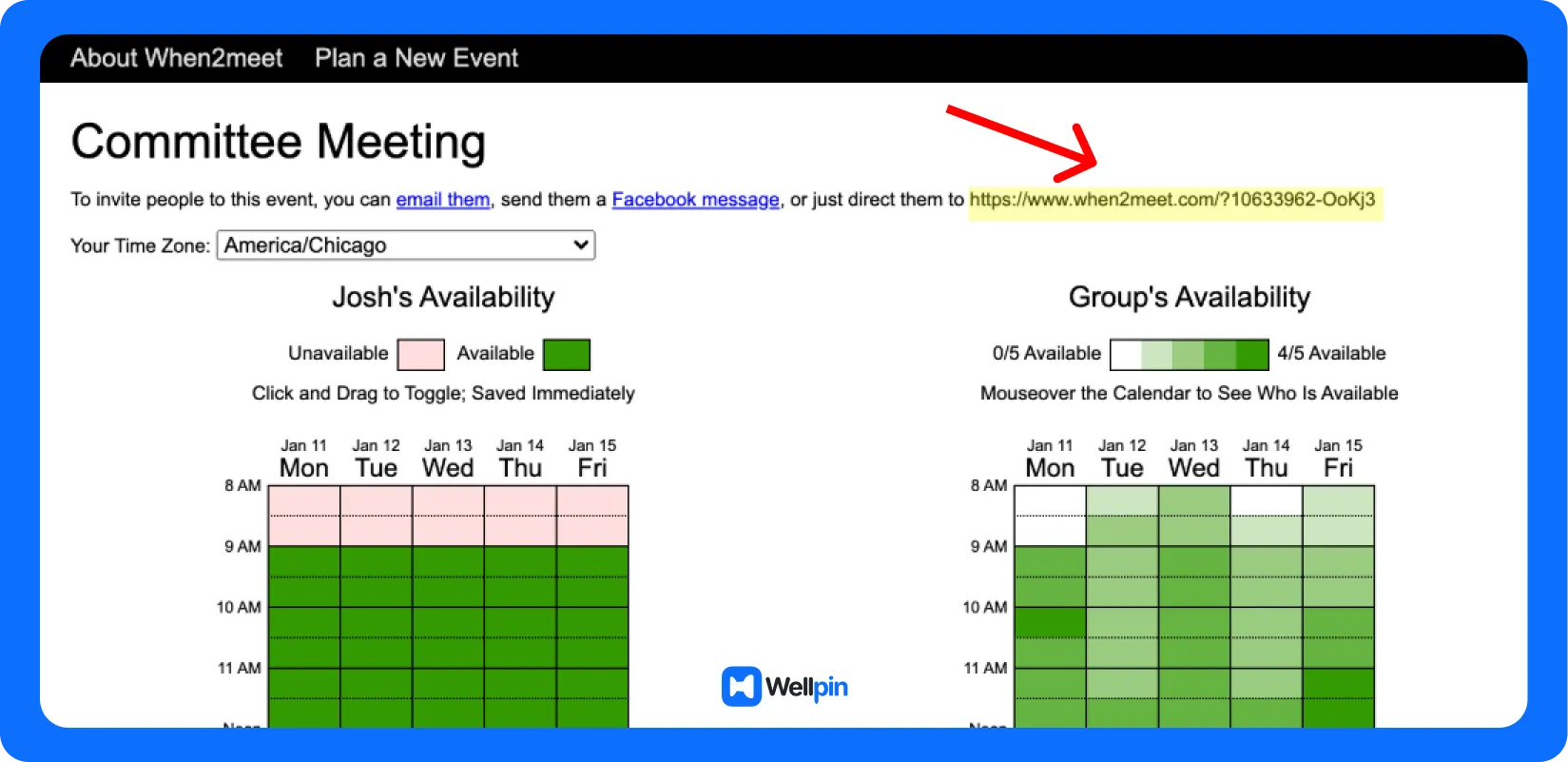
Once the event is created, When2Meet generates a unique link.
Send that link to everyone who needs to participate.
Teams usually share it through:
- Slack
- internal chat tools
Anyone who opens the link becomes part of the scheduling poll and can mark their availability across the available time slots.
Step 3: Participants Mark Their Availability
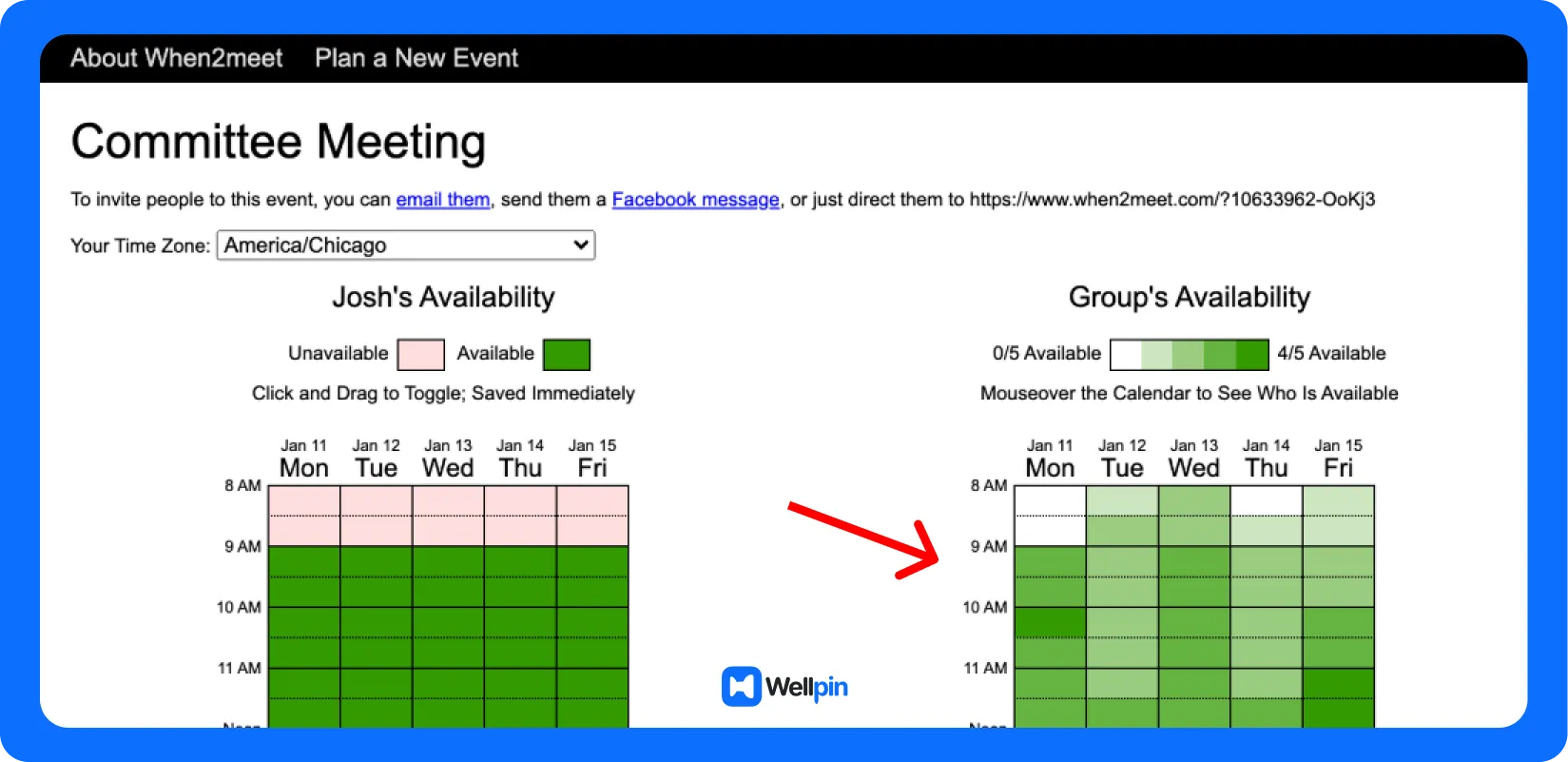
Participants select the time slots when they are available by clicking or dragging across the calendar grid.
As more people add their availability, the system highlights overlapping schedules.
This visual overlap is the core mechanism behind When2Meet making it easier to coordinate group availability without manually comparing everyone's calendar.
Some modern scheduling tools attempt to automate this step entirely by reading participants’ calendars and suggesting meeting times automatically.
But When2Meet keeps things manual.
Simple. Transparent. Effective.
Step 4: Identify the Best Meeting Time
Finally, you look for the darkest green time slots.
Those represent the periods where the largest number of participants are available.
Pick one of those slots… and that's your meeting.
At that point you’ll usually create the actual meeting event in Google Calendar, add a video conferencing link like Google Meet, and send invitations manually.
Not the most automated workflow, but it works.
And for quick meeting scheduling, that's often enough.
Limitations of When2Meet
So yeah, the tool works. And honestly, it has been helping people schedule meetings for years without much fuss.
However, When2Meet is not fully optimized for mobile devices, which can hinder accessibility and convenience for users on the go.
But once you start using it regularly, especially for team scheduling or recurring group meetings a few limitations begin to show up. Not immediately. At first everything feels simple and efficient. Then… small annoyances start stacking.
And suddenly that “simple scheduling tool” starts feeling a little dated.
Let’s talk about the main ones.
No Booking Pages or Client Scheduling
Another limitation becomes obvious if you’re trying to use When2Meet for professional scheduling.
The platform doesn’t support booking pages or appointment management. There’s no dedicated booking page where clients can choose a time, no way to configure services, and no built-in payment processing. Additionally, When2Meet does not offer custom branding options, which can be important for businesses seeking a professional appearance.
That’s why tools like Acuity Scheduling or other professional scheduling software are often used by service businesses. They allow companies to create branded scheduling pages, automate appointment confirmations, and manage customer bookings in a structured way.
When2Meet simply wasn’t designed for that.
It works great for coordinating group availability, but it’s not built for businesses that rely on appointments, client scheduling, or structured workflows.
Which is why many small business owners eventually move toward more advanced online scheduling tools once their scheduling needs grow.
No Workflow Automation or Video Integrations
One more thing worth mentioning: When2Meet doesn't integrate with most modern collaboration tools.
There's no built-in video conferencing support like Google Meet, Zoom, or Microsoft Teams. It also lacks automated workflows that handle confirmations, rescheduling, or follow-ups.
So once the meeting time is selected, the rest of the process happens somewhere else.
You create the meeting link manually.
You send reminders manually.
You update the calendar manually.
For small groups or occasional scheduling, this isn't a problem. But for teams running frequent group meetings or coordinating across departments, automation becomes really valuable.
Some modern online scheduling platforms try to reduce this friction by combining scheduling, notifications, reminders, and integrations into a single workflow.
When2Meet vs Modern Scheduling Tools
When comparing When2Meet to modern scheduling tools - the difference really comes home. When2Meet gets the job done alright for simple group coordination - that's especially true when all you need to do is find a time slot that everyone can agree on, with no fuss about setting up an account or integrating it with other tools.
But most modern scheduling apps go way beyond just showing you who's free and when. They're built with more complex workflows in mind and usually come with features like calendar syncing, automated reminders, a booking page, and the ability to keep your tools like Google Calendar & video conferencing platforms all connected in one go.
Because of that, When2Meet's really best used for just casual get-togethers or one-off meetings - but for teams who need to schedule things regularly, or for people who use scheduling in a more professional context, a more advanced tool is probably going to be a better choice when what you need is more automation and a smoother workflow.
Are There Better Alternatives?
Yes - it all depends on what you're trying to achieve.
Scheduling tools have moved on a lot since the days of simple availability polls. Instead of just collecting time slots and leaving it at that, the best ones have integrated calendar syncing, automated reminders, and some seriously sharp scheduling smarts to get the whole process done a heck of a lot faster and with a lot less hassle.
Tools like Wellpin are built around the idea of getting rid of all that tedious manual work by letting participants pick a time slot straight from your calendar. No more back-and-forth messages, no more bothering with follow-ups - it's all taken care of for you.
If you’re curious, we compared several modern options here Best When2Meet Alternatives: 5 Scheduling Tools to Manage Meetings and Appointments
The Bottom Line
When2Meet is a simple little tool that's perfect for quick group scheduling - it's free, easy to use and needs no setting up, and it's especially useful for casual meetups or small teams.
But the longer you use it, the more you'll start to notice its limitations. And as your scheduling becomes more regular or more complicated, you'll start to see how some of the more modern tools can make your life a lot easier. They offer automation, integrations, and proper workflows that can save you hours of time and a lot of hassle.
So the right choice, in the end, really does depend on what you need your workflow to be like. If all you need is a super quick, no-fuss way to find a time, When2Meet is more than enough. But if you're after a smoother, more streamlined scheduling process, then it might be worth looking at some of the more advanced options.