.jpg)

When2Meet Pros & Cons - A Free Scheduling Tool Worth Checking Out
You're trying to get five people in a room - or maybe eight. Trouble is, one of them is heading out of town, someone can't remember to sync their Google Calendar and before you know it, something that should be easy has turned into a right old headache.
After a few back-and-forth messages and trial & error attempts to get everyone's diaries to align, tools like When2Meet start to sound like a godsend. Its a pretty straightforward online scheduling tool built to make life a lot easier for groups to nail down a time that suits everyone.
Its lack of accounts and setup is one of the things that makes When2Meet so popular with students, freelancers or small teams on-the-go who just need a quick way to sort out their schedules.
But as with all things, scheduling tools have progressed - and while When2Meet is still free and a breeze to use, some of its limitations become a lot more apparent when meetings are taking place all the time or getting more complicated.
What Is When2Meet and How Does It Work?
When2Meet is a web-based scheduling tool that helps groups find a time that works for everyone. You create an event, set a time range, and share a link with participants.
They mark when they’re available, and the grid highlights overlapping time slots, making it easy to choose the best option. In practice, it works like a simple scheduling poll, but with a visual view of group availability.
The scheduling process usually goes like this:
1. Create an event

2. Share the event link
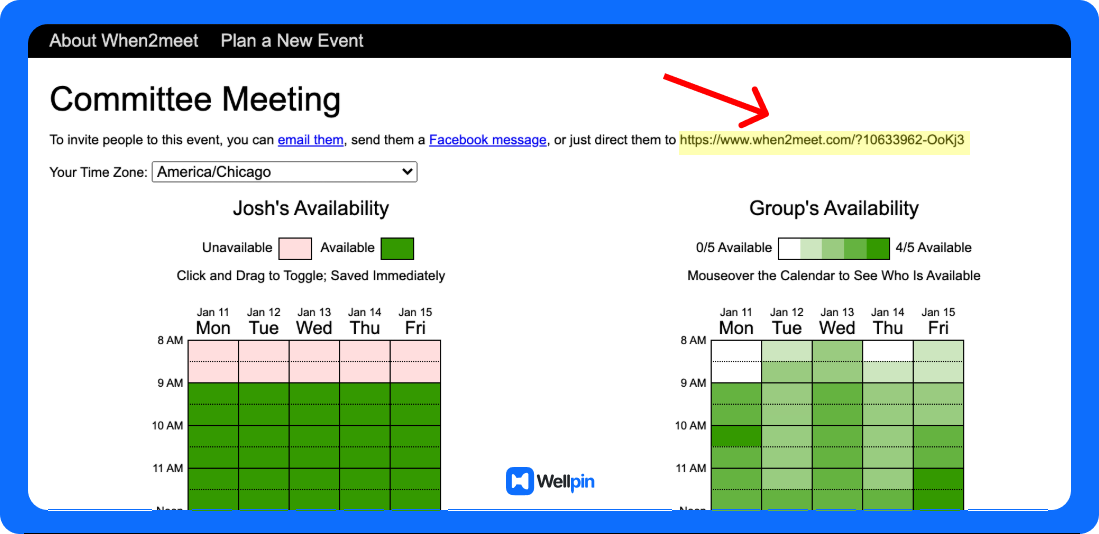
3. Participants mark their availability
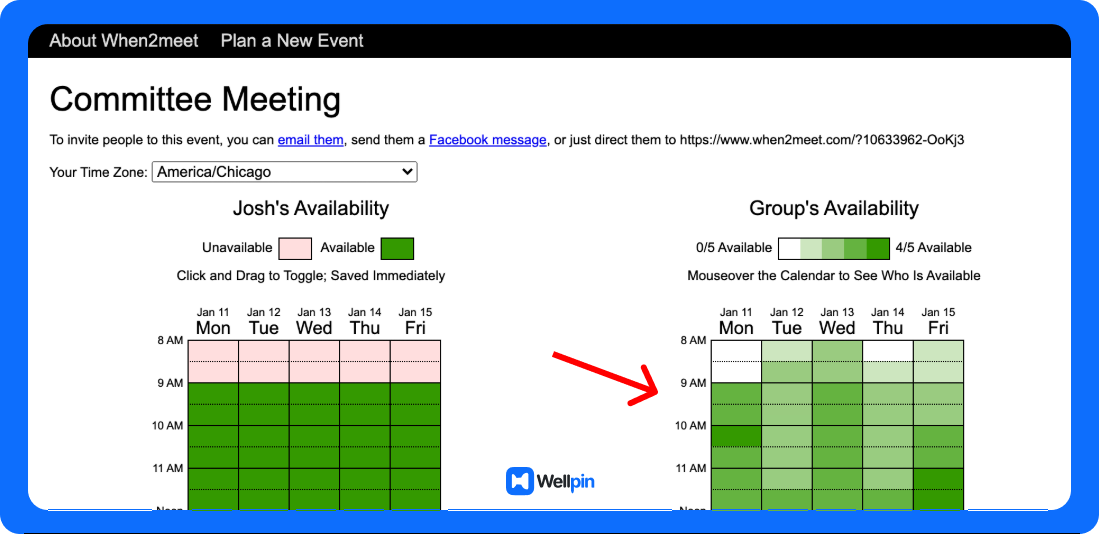
4. The group chooses the best meeting time
No login. No installation. No calendar integrations required.
Which is both the strength… and the weakness.
When2Meet was originally built for casual groups, university students, and small project teams that simply need a quick way of coordinating schedules. For one off events, it works surprisingly well.
But things get more interesting when you start comparing it with modern scheduling software.
Core Features of When2Meet
Before we get into the pros and cons, let's have a quick rundown on what this scheduling tool actually does. To be honest, When2Meet is a pretty stripped back piece of software that's solely focused on one thing: making it easy to find a time that everyone in a group is available for, without any of the hassle of setting up accounts, integrations or what have you.
Because of that, it's not exactly a feature-packed tool, especially when compared to some of the more modern scheduling software out there. But ironically, it's that very simplicity that makes it still a pretty popular choice - especially in situations where speed is of the essence and all you really need is something that gets the job done.
The Shared Availability Grid
The main part of the interface is a scheduling grid where each person just marks in the time slots they're free to attend a meeting. As more people start putting down their availability, the system visually flags up any time slots that you've all got in common - making it a whole lot easier to find a good meeting time without having to manually compare all your individual calendars.
It's a pretty clever approach that works especially well when you've got a group of people trying to coordinate with each other - because the main goal is just to find a time that works for everyone, rather than automating the whole scheduling process.
The Unique Event Link
Each time you schedule a meeting, you get a unique event link that you can just share with the other participants. Anyone who gets that link can then just open up the page, type in their name and pick their availability - without having to create an account or go through any kind of setup.
This makes the tool an absolute breeze to use for large groups or people who aren't part of your usual team - because there's no onboarding or setup required before you can get started.
Free - No Strings Attached
When2Meet is completely free to use, with no paid tiers, no subscriptions and no locked functionality. It's all supported through ads and donations, which means that anyone can use it, from students to small teams to casual users.
Pros of When2Meet
Alright. Let’s talk about the good stuff.
Because despite its age, the tool still has some real advantages.
If you’re not familiar with the platform yet, it might help to first check our detailed walkthrough When2Meet: Ultimate Step-by-Step Guide to Scheduling Group Meetings where we explain how the scheduling process actually works from start to finish.
Now let’s look at the main reasons people still use When2Meet today.
Free - No Strings Scheduling Tool
One of the standout benefits of When2Meet is that you can use it without spending a single penny. There are no paid subscriptions, tiers, or feature limitations to worry about - just the full tool available at your fingertips. And to be honest, this is a rare find in the world of scheduling software.
That makes it a sensible choice for people who just need to coordinate availability without any of the bells and whistles - think students, small teams and community groups. If you're simply trying to figure out when everyone is free to meet without breaking the bank, then the free version will probably do the trick just fine.
Super Simple & Easy to Use
Another big selling point of When2Meet is how straightforward it is to use. The tool is all about making scheduling as painless as possible - just pick your available time slots and see where they overlap, without any fuss or extra steps to slow you down.
As a result, the tool has virtually no learning curve. For casual, low-key scheduling - especially in informal or small group settings - that simplicity might even outperform the more complicated tools designed specifically for business use.
No Account Required = Less Fuss
Unlike most other modern scheduling tools, When2Meet doesn't make you sign up for an account before you can start using it. Just grab the event link, open up the page and enter your name to start marking your availability - easy peasy.
That really cuts down on friction, especially when you're coordinating with a large group or people outside of your team. It eliminates the need for all the usual onboarding hassle and lets you get the people you need to respond, quickly.
Perfect for One-Off Events
When2Meet really shines when it comes to one-off meetings where all you need to do is find a time slot that works for everyone. It's great for things like study sessions, team brainstorms or casual group planning.
Because it doesn't have any fancy integrations or automation features, the tool is really best suited to simple scheduling and not so much for ongoing meetings or anything that involves a lot of repeat scheduling.
Cons of When2Meet
When2Meet works okay for the most basic of scheduling needs, but things start to fall apart as soon as you try to tackle anything on the next level. The tool just can't keep up with the automation and integrations that are now pretty much standard in most scheduling platforms, which means everything gets bogged down.
Outdated Calendar Syncing
One of the biggest downsides is that When2Meet doesn't hook up to Google Calendar, Outlook or any of the other scheduling tools that you probably use. So you're stuck manually checking your availability before picking a time - which is just a recipe for disaster.
More often than not, this leads to scheduling conflicts - or worse still, double bookings - especially when your schedule changes in the blink of an eye. On the other hand, most modern scheduling tools have got this down to a fine art, automatically detecting your availability in real time and cutting down the risk of screw-ups.
No Help With Reminders
Another major shortcoming is that When2Meet doesn't send any reminders or notifications - no confirmation emails, no alerts to let you know that a meeting is coming up. You're basically stuck relying on tools like Google Calendar or your messaging apps to keep you on track.
And without any automated reminders, it's easy to just plain forget about a meeting - especially when you're dealing with a frantic professional environment where everyone's always juggling a million different tasks at once.
The Mobile Experience is a Letdown
Now, I know When2Meet is accessible on mobiles, but let's be real - the experience just isn't designed with smaller screens in mind. Navigating the availability grid is a total nightmare, so if you need to schedule or update meetings on the go, forget about it.
Modern scheduling tools usually have interfaces that are super responsive - or even better, they've got dedicated mobile apps that make scheduling a breeze.
No Booking Pages or Client Scheduling Options
When2Meet just isn't designed for the kind of scheduling workflows that professionals and businesses need. You can't even get booking pages, customization options or features like payments or branded scheduling links.
For most people, that means When2Meet just can't be used as a main scheduling tool - and that's a real shame.
Lack of Functionality
At the end of the day, When2Meet just doesn't have much going on. No automated workflows, no integrations with tools like Google Meet, no team-level scheduling options... it's all just pretty basic stuff.
As a result, When2Meet starts to feel like a clunky old scheduling platform that's just been left behind by the times - all compared to the modern scheduling tools that are all about automation, integrations and streamlined coordination.
When2Meet vs Other Scheduling Tools
The interesting part comes when you start comparing Doodle vs When2Meet or evaluating other scheduling tools. In addition to Doodle and When2Meet, there are many other tools available, such as Calendly, Setmore, SavvyCal, Zoho Bookings, YouCanBookMe, SimplyMeet.me, Bookafy, Appointlet, Koalendar, and Amelia for WordPress sites. These tools often provide more features, integrations, and compatibility with different platforms, making them suitable for a variety of scheduling and poll management workflows. For example, Amelia integrates seamlessly with a WordPress site, enhancing appointment scheduling and booking management for service businesses.
In a typical Doodle vs When2Meet comparison, both tools rely on basic polls to find a meeting time. However, modern scheduling platforms increasingly focus on automation.
Doodle is an online scheduling tool that uses polling to streamline organizing meetings by allowing participants to vote on their preferred time slots. Doodle offers more advanced features than When2Meet, including calendar integrations, reminders, and customizable polls. Doodle provides a more polished user experience and is better suited for professional environments that require advanced scheduling capabilities.
For example:
- Acuity Scheduling provides professional booking page systems with payment processing
- tools with calendar sync automatically detect availability
- advanced platforms integrate directly with Google Meet or Microsoft Teams
Both When2Meet and Doodle allow users to schedule meetings across different time zones, but Doodle offers more robust time zone support.
Even when comparing Doodle pricing, many users notice that modern paid versions offer significantly more automation. Doodle's pricing includes a free plan with limited features and several paid tiers that unlock additional functionalities. Doodle offers more features, especially in its paid plans, such as integrations and customization options, compared to When2Meet's basic free tier.
The main difference comes down to scheduling needs.
If you want basic polls for group meetings, When2Meet still works. But if you’re running a small business, managing recurring meetings, or keeping clients happy, a more advanced scheduling tool may be the right scheduling tool.
Key Factors When Choosing a Scheduling Tool
So how do you decide?
A few key factors usually determine the best option:
- your scheduling needs
- whether you require calendar sync
- if you need automatic reminders
- the importance of custom branding
- whether meetings involve clients or internal teams
For simple group scheduling, When2Meet is still perfectly fine.
For professional scheduling, the lack of automation can become frustrating.
Scheduling Software for Large Groups
Trying to sort out a schedule for a big group can become a mindbending logistical nightmare. The more people you're trying to juggle, the more likely it is that everyone will be left scratching their heads trying to find a time that works – and the easier it is for important meetings or tasks to fall through the cracks. That's where good scheduling software comes in to save your sanity.
Doodle vs When2Meet for Group Scheduling
Two of the hottest tools for group scheduling are Doodle and When2Meet. Both are designed to make life easier for the person organising, but they go about it in slightly different ways.
Doodle has a clean interface and lots of features that are just what you need for bigger teams. You can create polls to see what time works for everyone, invite loads of people, and let them vote on their preferred time slots. Its automatic reminders are also a real lifesaver – especially when you're trying to corral busy work schedules across departments or orgs.
When2Meet, on the other hand, does things the simple way. It's got a really useful visual grid that lets you see in an instant who's available when - without having to sign in or navigate a bunch of complicated menus. Its not got all the bells and whistles that Doodle does, but its dead simple so anyone can just jump in and get going.
When it comes to big group scheduling, the right tool is all about what you need. If you just want a no-nonsense way to see when everyone is free, When2Meet does the trick. But if you're after a more robust tool with reminders, calendar sync, and a smoother scheduling process, Doodle or similar platforms might be the way to go.
At the end of the day, both tools are designed to take the chaos out of group scheduling – helping you stay on top of things, avoid endless email threads, and actually get everyone in the same room - even if it is just a virtual one.
Final Thoughts
When2Meet has been around for a while for good reason. Its simplicity, plus being free, makes it a handy tool that nails the one thing most people need: find a single time that works for everyone, all without needing to create an account or set anything up.
For a quick, casual use - think a small team, students or a one-off meetup- it still gets the job done pretty well. The fact it's no-frills means it loads fast and is easy to share, which is perfect if you just need a super quick way to see when people are free.
BUT, the moment things start to get a bit more complicated – like if you're doing regular meetings, dealing with clients, or trying to sort out time zones – then the lack of integration with your calendar, reminders and automated scheduling becomes a real pain. You end up having to do more legwork than you need to.
So, you don't have to worry about Whether When2Meet works – it does. The real question is, is it enough to handle the way things are done nowadays with meetings. And could a bit more automation really help save you time and effort in getting everyone, on the same page.